
PreFlight1.53 - App Store
You'll be able to see results in few seconds.
Publisher Description
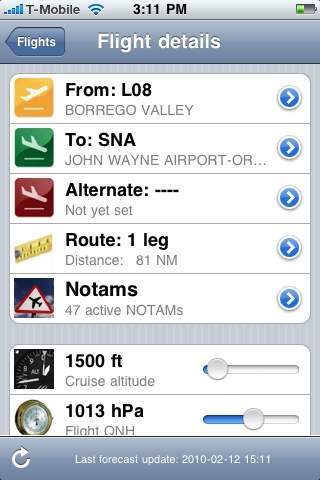
There is realy is no excuse for not reading the NOTAMs prior to your flight! With Pre-Flight 1.3 you don't need one! Notams are automatically downloaded and displayd on a map along with your planned route....
Pre-Flight is a multi-leg flight planning tool. It allows you to do most of the work that would normally require a ruler, maps, protractor and E6B calculator. What is more: Pre-flight provides you with a world wide forecast for wind aloft which is automatically used to calculate the wind correction angle for each leg of your flight and to suggest the most economic cruise altitude.
To set up a flight takes less then 5 minutes: select your origin, destination and alternate fields from a build in database. Add optional (custom) waypoints to your route. Select your aircraft from the list of aircraft available. Set your desired cruise altitude, temperature and QNH and you are ready!
Pre flight calculates:
- The wind aloft (from on-line database)
- Time and fuel requirements
- Magnetic heading, wind correction, true course
- Most economic altitude for every leg in the flight
Pre-Flight also supports:
- Multiple planned flights
- World wide forecast for wind aloft for the next two days
- Map-based custom way point editing
- A database of over 52000 fields and nav-aids
- Simple slider based controls.
Check it out. It's cool
Changes in version 1.2
- Fixed problems updating wind forecast for German and Spanish time zone settings
- Updated the database to include ALL FAA registered nav aids
- Updated the database to include ALL FAA registered airports
- Allows search for FAA identifiers
- Improved entry of W&B settings
- Display a map of the current route
- Improved pin handling for setting VFR waypoints
Requires iOS 4.3 or later. Compatible with iPhone, iPad, and iPod touch.
About PreFlight
The company that develops PreFlight is roeland van der spek. The latest version released by its developer is 1.53.
To install PreFlight on your iOS device, just click the green Continue To App button above to start the installation process. The app is listed on our website since 2009-11-13 and was downloaded 0 times. We have already checked if the download link is safe, however for your own protection we recommend that you scan the downloaded app with your antivirus. Your antivirus may detect the PreFlight as malware if the download link is broken.
How to install PreFlight on your iOS device:
- Click on the Continue To App button on our website. This will redirect you to the App Store.
- Once the PreFlight is shown in the iTunes listing of your iOS device, you can start its download and installation. Tap on the GET button to the right of the app to start downloading it.
- If you are not logged-in the iOS appstore app, you'll be prompted for your your Apple ID and/or password.
- After PreFlight is downloaded, you'll see an INSTALL button to the right. Tap on it to start the actual installation of the iOS app.
- Once installation is finished you can tap on the OPEN button to start it. Its icon will also be added to your device home screen.
Program Details
System requirements
Download information
Pricing
Version History
version 1.53
posted on 2009-11-13
Disclaimer
Official App Store Link
We do not host PreFlight on our servers. We did not scan it for viruses, adware, spyware or other type of malware. This app is hosted by Apple and passed their terms and conditions to be listed there. We recommend caution when installing it.
The App Store link for PreFlight is provided to you by apps112.com without any warranties, representations or guarantees of any kind, so access it at your own risk.
If you have questions regarding this particular app contact the publisher directly. For questions about the functionalities of apps112.com contact us.
